
HubZellHubZell Docs

Gateway API

Gateway API reference

The Gateway service is the reseller integration layer for top-ups, bill payments, and order lookups. Order and status endpoints use POST with JSON bodies; the catalog lookups (balance, categories, products) are bodyless GETs instead.

Base URL: http://localhost:3105/api/v1

Authentication

Every request must include the X-Api-Key, X-Timestamp, and X-Signature HTTP headers. Credentials are validated on every call; the JSON body never carries them.

FieldTypeRequiredDescription
Content-TypestringYesMust be `application/json`
X-Api-KeystringYesShop API key issued by HubZell
X-TimestampintegerYesUnix timestamp in seconds; must be within ±5 minutes of server time
X-SignaturestringYesHex HMAC-SHA256 digest of `secret_key`. Please see the example below for how to generate the signature.
IP whitelist required. The caller IP must be registered in the shop's whitelist. An empty whitelist blocks all requests until IPs are configured in the reseller console.
Node.js
const crypto = require('crypto');

const SECRET_KEY = process.env.HUBZELL_SECRET_KEY;
const timestamp = Math.floor(Date.now() / 1000);

const method = 'GET';
const path = '/api/v1/balance';
const rawBody = '';

const signature = crypto
  .createHmac('sha256', SECRET_KEY)
  .update(`${method}\n${path}\n${timestamp}\n${rawBody}`)
  .digest('hex');

const res = await fetch('{{BASE_URL}}/balance', {
  method,
  headers: {
    'x-api-key': process.env.HUBZELL_API_KEY,
    'x-timestamp': String(timestamp),
    'x-signature': signature,
  },
});
const json = await res.json();

Console setup

Two things must be configured in the reseller console's Developer page before the Gateway API will accept your requests — a missing callback URL means order results never reach you, and an empty IP whitelist blocks every request outright.

1. Add your callback (webhook) URL

  1. Log into the Reseller Console (your shop login).
  2. Open the Developer tab in the sidebar.
  3. Find the Callback URL section.
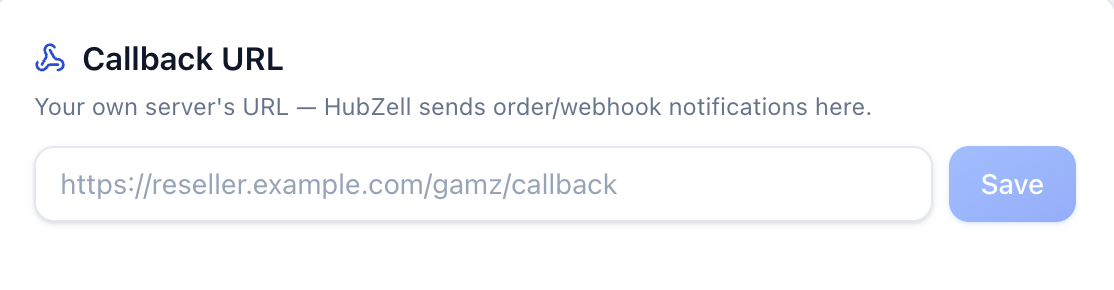
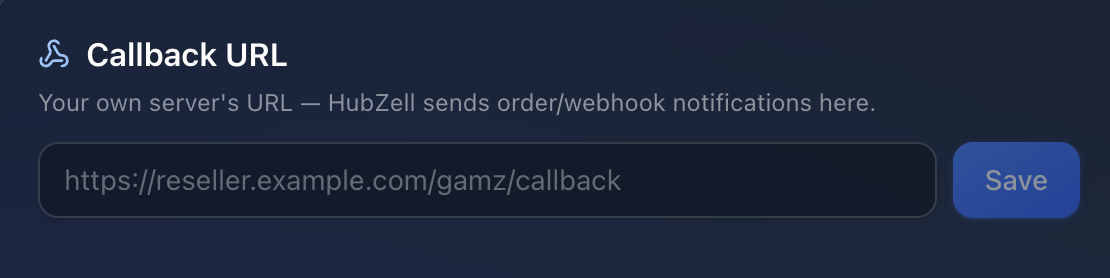
    Callback URL field on the Developer page
  4. Paste your endpoint and click Save.

On the Developer page, paste your endpoint into the Callback URL field and click Save. HubZell posts order results here as a plain JSON request — see Order result callback below for the exact payload.

The URL must be publicly reachable (HTTPS strongly recommended — it's carrying live order results over the open internet) and respond with a 2xx HTTP status within a few seconds. Delivery is best-effort with no retry, so poll /orders/by-transaction/TXN_ID for anything you don't want to risk missing. Changes save immediately and apply to the next callback — no propagation delay.

Keep this URL secret — anyone who knows it can POST fake order results to it. Minimal Node/Express example:

Node.js
app.post('/gamz/callback', express.json(), (req, res) => {
  const { client_ref, status } = req.body;
  handleOrderResult(client_ref, status);

  res.sendStatus(200);
});

2. Whitelist your IP

  1. Log into the Reseller Console (your shop login).
  2. Open the Developer tab in the sidebar.
  3. Find the IP Whitelist section.
  4. Add your server's IP address — add as many as you need, one at a time.

On the same page, click "Add my current IP" to whitelist the address you're browsing from, or type a specific IP under IP Whitelist and click Add. This step is required, not optional — an empty whitelist doesn't mean open access, it means every request is rejected with 403 IP_NOT_WHITELISTED until at least one IP is added.

IPs are added and removed one at a time, IPv4 or IPv6 (no CIDR ranges). There's no limit on how many you can whitelist, and a change takes effect on the very next request — it's checked live, not cached. Remove an entry the same way, from the same list.

If the server placing orders doesn't have a static outbound IP (common behind consumer NAT, some cloud auto-scaling groups, or residential/mobile connections), it'll need re-whitelisting whenever that IP changes. For anything beyond testing, place your integration behind a static IP or a NAT gateway with a fixed egress address.

Response format

Successful responses are wrapped in a uniform envelope. HTTP status codes reflect errors (401, 403, 404, 400, etc.) with the same JSON shape.

Success
{
  "status": 0,
  "code": "SUCCESS",
  "message": "success",
  "data": { ... }
}
Error
{
  "status": 1,
  "code": "INVALID_SIGNATURE",
  "message": "Invalid credentials",
  "data": null
}

Status codes

The envelope's code field is always one of the following.

CodeHTTP statusMeaning
SUCCESS200The request succeeded.
MISSING_CREDENTIALS401One or more of the X-Api-Key, X-Timestamp, or X-Signature headers is missing from the request.
INVALID_TIMESTAMP_FORMAT401X-Timestamp isn't a valid unix timestamp in seconds.
EXPIRED_TIMESTAMP401X-Timestamp is more than 5 minutes off from the server's clock.
UNKNOWN_API_KEY401X-Api-Key doesn't match any shop on file — check you're using the key from the Developer page, not the secret_key.
INVALID_SIGNATURE401X-Signature doesn't match the expected HMAC — check your secret_key and how the signature string is built.
IP_NOT_WHITELISTED403The caller's IP isn't in your shop's IP whitelist. Add it on the reseller console's Developer page (see Console setup above) — an empty whitelist blocks every IP, it doesn't allow all of them.
IP_BLOCKED403This IP has been blocked by HubZell directly, independent of your shop's whitelist — typically abusive or scanning traffic.
SHOP_DISABLED403Your shop account has been disabled. Contact HubZell support.
KYC_NOT_APPROVED403Your shop's KYC hasn't been approved yet — order placement is disabled until it is.
INSUFFICIENT_BALANCE400Your wallet's available balance can't cover this request.
CALLBACK_URL_REQUIRED400Your shop's callback URL isn't configured yet — set one on the Developer page before placing orders.
VALIDATION_ERROR400The request body failed validation — check the response's message field for which field(s) are wrong.
DUPLICATE_REQUEST409This request has already been processed.
MAINTENANCE_MODE503The Gateway is temporarily under maintenance — retry shortly.
NOT_FOUND404The requested route doesn't exist — check the endpoint path and method.
INTERNAL_ERROR500An unexpected server error occurred. If this persists, contact HubZell support.

Webhook Response

POST{shop callback_url}

Order result callback

When an async payment is confirmed, HubZell relays the result to your shop's configured callback_url, as a plain JSON POST body — no custom headers or signature, since the callback URL itself is a secret you configured. Only final statuses are delivered, best-effort with no retry — poll /orders/by-transaction/TXN_ID if you never receive one. For CASHCARD orders, the purchased card details are returned in cashcard_ref1 / cashcard_ref2 (also mirrored inside delivered_content).

Callback payload

Posted to your as application/json.

FieldTypeDescription
transaction_idstringTransaction id, when available
client_refstringYour order reference, as sent when the payment was placed
statusstringResult status — SUCCESS or FAILED
inputobjectThe original input you submitted when placing the order
categorystringProduct category for this order
amountnumberAmount charged for this order
currencystringCurrency code for amount
messagestringHuman-readable result message
failure_reasonstringReason for failure, set only when status is FAILED
cashcard_ref1stringCASHCARD only — first card reference of the purchased card (e.g. card serial number), set only when status is SUCCESS. Not sent for other categories
cashcard_ref2stringCASHCARD only — second card reference of the purchased card (e.g. card PIN / redeem code), set only when status is SUCCESS. Not sent for other categories
delivered_contentobjectGoods delivered for this order, set only when status is SUCCESS and the product delivers something. For CASHCARD it holds the same cashcard_ref1 / cashcard_ref2 values as the top-level fields. null otherwise
created_atstringWhen the order was created
completed_atstringWhen the order reached a final status, when available
Example CallBack Payload
{
  "transaction_id": "987654321",
  "client_ref": "ORD20260708001",
  "status": "SUCCESS",
  "input": {
    "uid": "234750130579422976",
    "server_id": "asia-01"
  },
  "category": "GTOPUP",
  "amount": 100,
  "currency": "THB",
  "message": "Topup successful.",
  "failure_reason": null,
  "delivered_content": null,
  "created_at": "2026-07-08T02:30:00.000Z",
  "completed_at": "2026-07-08T02:30:05.000Z"
}
Example CallBack Payload (Cash Card)
{
  "transaction_id": "987654322",
  "client_ref": "CASH20260923001",
  "status": "SUCCESS",
  "input": {
    "ref1": "0718814500"
  },
  "category": "CASHCARD",
  "amount": 54.17,
  "currency": "THB",
  "message": "Topup successful.",
  "failure_reason": null,
  "cashcard_ref1": "262-F85-0001146",
  "cashcard_ref2": "9UE7US89ACTS",
  "delivered_content": {
    "cashcard_ref1": "262-F85-0001146",
    "cashcard_ref2": "9UE7US89ACTS"
  },
  "created_at": "2026-09-23T04:22:27.467Z",
  "completed_at": "2026-09-23T04:22:30.259Z"
}

Your response

Return any 2xx HTTP status to acknowledge. The response body isn't read.

balance

GET{{BASE_URL}}/balance

Get wallet balance

Returns the authenticated shop wallet balance (available and held funds).

Request example

No request body — call GET on the endpoint above with just the signed headers.

curl
# ... other code omitted ...

curl -X GET 'http://localhost:3105/api/v1/balance' \
  -H "X-Api-Key: $HUBZELL_API_KEY" \
  -H "X-Timestamp: $HUBZELL_TIMESTAMP" \
  -H "X-Signature: $HUBZELL_SIGNATURE"

Response

FieldTypeDescription
shopstringShop code
currencystringWallet currency (e.g. THB)
availablenumberSpendable balance
heldnumberFunds reserved for in-flight orders
Example response
{
  "status": 0,
  "code": "SUCCESS",
  "message": "success",
  "data": {
    "shop": "demo",
    "currency": "THB",
    "available": 50000,
    "held": 150
  }
}
GET{{BASE_URL}}/categories

List categories

Catalog categories available in the shop's own currency — use items[].code as the category filter on /products.

Request example

No request body — call GET on the endpoint above with just the signed headers.

curl
# ... other code omitted ...

curl -X GET 'http://localhost:3105/api/v1/categories' \
  -H "X-Api-Key: $HUBZELL_API_KEY" \
  -H "X-Timestamp: $HUBZELL_TIMESTAMP" \
  -H "X-Signature: $HUBZELL_SIGNATURE"

Response

FieldTypeDescription
itemsarrayList of categories
items[].codestringCategory code — pass this exact value as category on /products
items[].namestringDisplay name
Example response
{
  "status": 0,
  "code": "SUCCESS",
  "message": "success",
  "data": {
    "items": [
      {
        "code": "GTOPUP",
        "name": "Game Top-up"
      },
      {
        "code": "MTOPUP",
        "name": "Mobile Top-up"
      }
    ]
  }
}
GET{{BASE_URL}}/products

List products

Catalog of enabled products (games, billers, top-up products), grouped by category. Requires a positive wallet balance — a shop with zero or negative available balance gets a 400 INSUFFICIENT_BALANCE instead of the catalog.

Request example

No request body — send these as query string parameters on the GET URL above (not covered by the signature).

FieldTypeDescription
categoryenumFilter by category: MTOPUP | CASHCARD | GTOPUP | BILLPAY
curl
# ... other code omitted ...

curl -X GET 'http://localhost:3105/api/v1/products?category=GTOPUP' \
  -H "X-Api-Key: $HUBZELL_API_KEY" \
  -H "X-Timestamp: $HUBZELL_TIMESTAMP" \
  -H "X-Signature: $HUBZELL_SIGNATURE"

Response

FieldTypeDescription
itemsarrayCategory groups
items[].categoryenumMTOPUP | CASHCARD | GTOPUP | BILLPAY
items[].productsarrayProducts in this category
items[].products[].product_idstringReseller-facing product code
items[].products[].product_namestringDisplay name
Example response
{
  "status": 0,
  "code": "SUCCESS",
  "message": "success",
  "data": {
    "items": [
      {
        "category": "GTOPUP",
        "products": [
          {
            "product_id": "HUBZELL_THB_MLBB",
            "product_name": "Mobile Legends: Bang Bang"
          }
        ]
      }
    ]
  }
}
GET{{BASE_URL}}/products/{id}

Get product by id

Full detail for a single product, including its fixed-price plans (services) — this is where you get the service_id needed for /orders/create. Requires a positive wallet balance — a shop with zero or negative available balance gets a 403 INSUFFICIENT_BALANCE instead of the detail.

Request example

No request body — the field below is part of the URL path above, not the query string or body.

FieldTypeRequiredDescription
idstringYesPath parameter — the product's product_id, e.g. /products/HUBZELL_THB_MLBB
curl
# ... other code omitted ...

curl -X GET 'http://localhost:3105/api/v1/products/{id}' \
  -H "X-Api-Key: $HUBZELL_API_KEY" \
  -H "X-Timestamp: $HUBZELL_TIMESTAMP" \
  -H "X-Signature: $HUBZELL_SIGNATURE"

Response

FieldTypeDescription
categoryenumMTOPUP | CASHCARD | GTOPUP | BILLPAY
product_idstringReseller-facing product code
product_namestringDisplay name
currencystringCurrency code
inputsarrayRequired fields to identify the player's account, sent as input on /orders/create. Empty array = none needed. E.g. Mobile Legends requires uid (Game ID) and server_id (Server ID).
inputs[].namestringField key for input on /orders/create, e.g. "uid" (Game ID), "server_id" (Server ID)
inputs[].typestringInput type label, e.g. "string"
inputs[].validationstringRegex the input value must match, when set
inputs[].examplestringExample value, when set
servicesarrayFixed-price plans, reseller price already marked up (empty for variable-amount services e.g. BILLPAY)
services[].idstringcatalog_service id — pass this exact value as service_id on /orders/create to select this plan directly
services[].pricenumberReseller price for this plan
services[].namestringPlan label, e.g. "100 Diamonds"
Example response
{
  "status": 0,
  "code": "SUCCESS",
  "message": "success",
  "data": {
    "category": "GTOPUP",
    "product_id": "HUBZELL_THB_MLBB",
    "product_name": "Mobile Legends: Bang Bang",
    "currency": "THB",
    "inputs": [
      {
        "name": "uid",
        "type": "string",
        "validation": "^[0-9]{5,12}$",
        "example": "13195329"
      },
      {
        "name": "server_id",
        "type": "string",
        "validation": "^[0-9]{4,5}$",
        "example": "5028"
      }
    ],
    "services": [
      {
        "id": "HUBZELL_THB_MLBB_001",
        "price": 6.18,
        "name": "100 Diamonds"
      },
      {
        "id": "HUBZELL_THB_MLBB_002",
        "price": 61.8,
        "name": "1000 Diamonds"
      }
    ]
  }
}

orders

POST{{BASE_URL}}/orders/create

Create order

Resolves service_id to a catalog_service price tier, charges the shop wallet, and submits a top-up or bill payment. The result may not be final yet when this call returns — some orders complete asynchronously, so poll /orders/by-transaction/TXN_ID or wait for the order result callback for the final status.

Request example

Send as application/json via POST to the endpoint above.

FieldTypeRequiredDescription
service_idstringYescatalog_service code (same value returned by /products under items[].services[]) — selects the exact price tier directly, the server resolves the amount
inputobjectYesInput field values required to place the order, e.g. { "uid": "...", "server_id": "..." }
client_refstringYesYour unique order reference (alphanumeric, max 20 chars)
curl
# ... other code omitted ...

HUBZELL_BODY='{"service_id":"HUBZELL_THB_MLBB_001","input":{"uid":"234750130579422976","server_id":"asia-01"},"client_ref":"BILL12345"}'

# ... other code omitted ...

curl -X POST 'http://localhost:3105/api/v1/orders/create' \
  -H 'Content-Type: application/json' \
  -H "X-Api-Key: $HUBZELL_API_KEY" \
  -H "X-Timestamp: $HUBZELL_TIMESTAMP" \
  -H "X-Signature: $HUBZELL_SIGNATURE" \
  -d "$HUBZELL_BODY"

Response

FieldTypeDescription
transaction_idstringTransaction id, when available at this point (null if one hasn't been returned yet)
service_idstringcatalog_service code the order was placed against, echoed back
inputobjectThe input you supplied, echoed back
client_refstringYour order reference, echoed back
total_amountnumberAmount charged to your wallet — the catalog_service's reseller price, resolved server-side, never a client-supplied figure
balancenumberYour HubZell wallet balance after this charge (auto-refunded and reflected here if the order is then rejected)
Example response
{
  "status": 0,
  "code": "SUCCESS",
  "message": "success",
  "data": {
    "transaction_id": "987654321",
    "service_id": "HUBZELL_THB_MLBB_001",
    "input": {
      "uid": "234750130579422976",
      "server_id": "asia-01"
    },
    "client_ref": "BILL12345",
    "total_amount": 27.04,
    "balance": 49900
  }
}
GET{{BASE_URL}}/orders/by-transaction/{transaction_id}

Get order details

Looks up a single order by transaction_id (the transaction_id returned from /orders/create).

Request example

No request body — the field below is part of the URL path above, not the query string or body.

FieldTypeRequiredDescription
transaction_idstringYesPath parameter — the transaction_id returned from /orders/create
curl
# ... other code omitted ...

curl -X GET 'http://localhost:3105/api/v1/orders/by-transaction/{transaction_id}' \
  -H "X-Api-Key: $HUBZELL_API_KEY" \
  -H "X-Timestamp: $HUBZELL_TIMESTAMP" \
  -H "X-Signature: $HUBZELL_SIGNATURE"

Response

FieldTypeDescription
transaction_idstringTransaction id, when available
client_refstringYour order reference
statusenumPENDING | SENT | SUCCESS | FAILED | REFUNDED | CANCELLED
inputobjectThe input you supplied when the order was placed
categorystringMTOPUP
amountnumberOrder amount
currencystringCurrency code
messagestring | nullResult message
failure_reasonstring | nullFailure reason when status is FAILED
created_atstringISO 8601 creation timestamp
completed_atstring | nullISO 8601 completion timestamp
Example response
{
  "status": 0,
  "code": "SUCCESS",
  "message": "success",
  "data": {
    "transaction_id": "987654321",
    "client_ref": "BILL12345",
    "status": "SUCCESS",
    "input": {
      "uid": "234750130579422976",
      "server_id": "asia-01"
    },
    "category": "GTOPUP",
    "amount": 100,
    "currency": "THB",
    "message": null,
    "failure_reason": null,
    "created_at": "2026-07-08T02:30:00.000Z",
    "completed_at": "2026-07-08T02:30:05.000Z"
  }
}